Apple Health as an AI Coach Data Layer: What It Passes Through
Apple Health is the most under-used piece of athlete infrastructure on the planet. It is also the most oversold. The pitch you will read everywhere goes like this: connect one app, and suddenly your WHOOP recovery score, your Oura readiness, your Polar HR data, and your strength log all feed one smart coach. The pipeline exists. The detail that gets skipped is which signals actually travel through it and which stay locked inside the device that measured them.
Movement Rebels reads HealthKit natively on the iOS app. This guide covers what that actually means: which metrics come through cleanly, which do not, and why the coach still needs more than a HealthKit connection to give you a useful recommendation.
What HealthKit does and does not pass through
HealthKit is a shared data layer. Third-party devices write processed outputs to it, and apps like Movement Rebels read from it. But devices choose what they share, and they do not share everything.
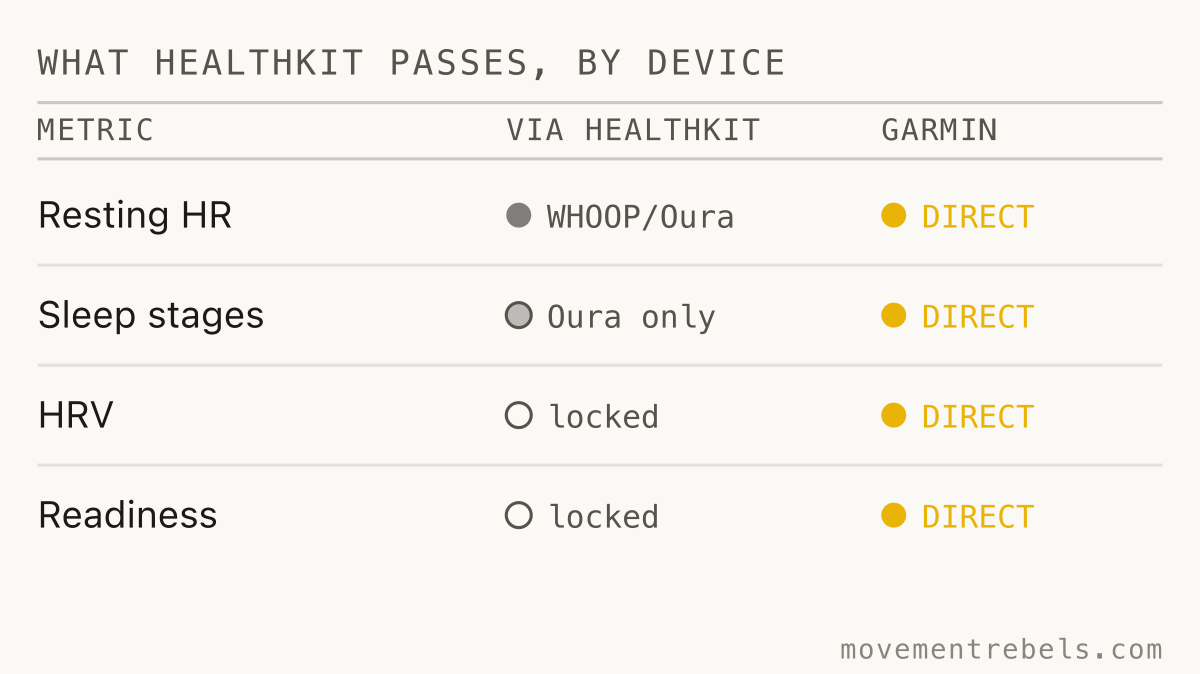
WHOOP connects to Apple Health and writes resting heart rate, respiratory rate, sleep duration (asleep and awake only, no staged breakdown), heart rate during the day, and SpO2 if your model supports it. What it does not write: HRV. WHOOP calculates HRV as RMSSD; Apple Health stores HRV as SDNN. The two metrics are related but produce different absolute numbers, so WHOOP made the decision to omit the field rather than publish a number that would confuse comparisons. The daily Recovery and Strain scores are proprietary composites. They do not leave the WHOOP app as queryable Apple Health metrics.
Oura connects to Apple Health and writes heart rate, sleep duration and stages, respiratory rate, steps, active energy, and workouts. The official Oura support documentation does not list HRV or Readiness score as exported fields. What arrives in Apple Health from an Oura ring is the same shape of data you would get from many other sleep trackers: duration, staged breakdown, average overnight heart rate.
Polar H10 and other chest straps write heart rate data from sessions into Apple Health when your Polar app is configured to share. That HR stream is useful for intensity validation. It does not include HRV in any form that HealthKit standardizes.
Garmin has a native direct integration in Movement Rebels, separate from Apple Health, and is the more complete path. The coach reads completed Garmin activities, analyzes the workout file, and pushes structured sessions back to your watch. For Garmin users, Apple Health is a fallback, not the primary route.
The practical summary: what reliably arrives in Apple Health from wearables is resting heart rate, heart rate time series, sleep duration and stages (from supported devices), SpO2, and workout records. Proprietary recovery composites and HRV from most devices do not. If your plan depends on the coach reading your WHOOP Recovery score or your Oura Readiness, that data is not in the HealthKit pipeline.
What Movement Rebels reads from HealthKit
Movement Rebels' iOS app reads the HealthKit signals that have enough signal quality and device support to be useful:
- Resting heart rate and its rolling trend
- Sleep duration and stage breakdown from devices that export staged data to Apple Health
- Workout history: distance, duration, heart rate zones, and route data (cross-check the cardio fitness figure with a VO2 max calculator from the Cooper test)
- HRV from Apple Watch, which writes SDNN overnight readings to HealthKit
- Body mass, lean mass, and body fat percentage
- Respiratory rate and SpO2 where your device records it
- Menstrual cycle data when logged in Apple Health
A note on Apple Watch HRV specifically. Research published in 2024 found that the Apple Watch Series 9 and Ultra 2 underestimate HRV by an average of 8.31 ms compared to a Polar H10 chest strap reference, with a mean absolute error of around 29%. The absolute numbers are not clinical-grade. The trend across days is still useful, and trend-based interpretation is how the coach uses it: a 20% drop from your seven-day baseline matters, even if the baseline itself sits a few milliseconds off what a lab would measure.
Resting heart rate accuracy from Apple Watch is much better, with the same study reporting a mean difference of -0.08 bpm. RHR trend is a clean signal and one the coach weights heavily. That same resting HR feeds a heart rate zone calculator with the Karvonen method, which sets your training bands off both your resting and max heart rate.
Why HRV is not enough on its own
The current wave of recovery-score apps has created an expectation that a single overnight number tells you whether to train hard or go easy. The research does not support that expectation applied strictly. A 2025 systematic review on sleep deprivation and HRV found that acute sleep loss suppresses RMSSD and shifts the autonomic system toward sympathetic dominance, which does show up in wearable readings. But a narrative review on HRV monitoring in tactical populations makes the case clearly that HRV must be interpreted alongside training load, sleep quality ratings, nutrition status, and subjective feedback to be actionable rather than misleading.
A low HRV reading could mean you are under-recovered from last week's volume. It could also mean you had one poor night of sleep, were dehydrated, or had a stressful morning before the reading was taken. The number alone does not distinguish between those causes, and the appropriate coaching response to each one is different.
This is the gap that the HealthKit pipeline, however complete, does not close. A data layer that feeds recovery metrics into a coach is more useful than one that does not. But the coach still needs to know what you ate, what you logged in the gym, what the week's plan looked like, and what you told it in chat. Context is not optional.

Cross-domain reasoning in practice
Here is where the HealthKit connection earns its keep, not as a standalone recovery oracle, but as one input in a loop that includes everything else.
You wake up Tuesday. Apple Health shows RHR up 5 bpm and sleep at 5 hours 40 minutes with a short deep-sleep block. Your planned session is a 90-minute zone 2 ride with two 8-minute threshold intervals. What the coach does not see is your Rebel Fuel log. Meals, calories and macros stay yours; tell it "eating at a deficit" in Notes for your coach and it reads your recovery trend against that. The calendar shows a 75-minute heavy squat session on Sunday.
A single-brand recovery app sees the HR and sleep data and says "take it easy today." The coach in Movement Rebels can say something more specific: your RHR and sleep suggest you are under-recovered, and your fuel log suggests the most likely cause is under-eating after Sunday's squat session rather than the plan being too aggressive. Keep the zone 2 base, drop the threshold blocks, hit your protein and carbohydrate targets today, and revisit threshold on Thursday. That recommendation gets written back to the planned session on the calendar.
That reasoning is not possible from HealthKit data alone. It is only possible because HealthKit, the strength log, the nutrition log, and the planned calendar all feed the same coach conversation. For more on how this cross-domain signal works in endurance training specifically, see HRV-guided training and marathon training with heart rate data.
How non-Apple wearables fit
The honest device picture for Apple Health users:
- WHOOP: resting HR, respiratory rate, sleep duration, and SpO2 come through. Recovery and Strain scores do not. HRV does not. The coach can use your RHR trend and sleep duration from WHOOP via Apple Health. For deeper WHOOP context, the WHOOP AI coaching guide covers what you can bring to the coach manually.
- Oura ring: sleep stages and duration, heart rate, and respiratory rate come through. Readiness score does not. HRV export from Oura to HealthKit is not listed in Oura's official integration documentation. Sleep quality from Oura is one of the better signals in the pipeline given Oura's sensor accuracy. See Oura ring coaching for how to get more out of the combination.
- Polar H10: heart rate from sessions writes to Apple Health. Good for validating session intensity. No recovery metrics.
- Garmin: skip Apple Health and use the native Garmin integration. It is more complete and bidirectional.
- Fitbit: does not natively write to Apple Health. This data does not reach the coach.
The honest framing for devices that do not have a direct integration: your device measures certain things well. Movement Rebels is the coaching and planning layer it lacks. Where your device exports metrics to Apple Health, the coach picks them up automatically. Where it does not, you bring that context to the chat conversation directly.
For a broader look at how different wearable signals stack up, WHOOP vs Oura vs Garmin covers the accuracy and use-case differences without the marketing gloss. And if you are drowning in metrics already, fitness data overwhelm is worth reading before adding another integration.
How Movement Rebels uses HealthKit data
The HealthKit connection works in the background on the native iOS app. You grant permission once during setup. After that, each morning the coach has your most recent sleep data, overnight RHR, and any workouts you logged through a device that writes to Apple Health.
The coach does not display a recovery dashboard. It uses the signals as inputs to the morning brief and the session recommendation for the day. If your RHR trend has been climbing for three days alongside heavier training volume, the coach surfaces that and adjusts the week's intensity. If your sleep data shows consistent short nights during a high-stress period, the coach factors that into the plan rather than ignoring it and handing you another hard session.
The adaptive training plan updates based on what actually happened, not just what was scheduled. HealthKit is one of the feedback channels that makes that adaptation possible.
Pricing
Movement Rebels is one app for the full picture: strength, endurance, hybrid, planning, coaching, fueling, recovery, tracking. The Apple Health integration, the AI coach, the 3,900+ workout library, Rebel Fuel meal logging with photo recognition, body composition tracking, and the breathwork and NSDR tools all live under one trial.
Start with a 7-day free trial. Full access, no card. After that, Pro+ is $20 per month for unlimited coaching.
One app instead of five.
Strength, endurance, recovery, fueling, planning, and your AI coach. All under a 7-day free trial. No card.
Start 7-day trialGarmin AI Coach: What Your Watch Knows vs. What a Coach Needs to Know
Garmin's built-in coaching balances run and ride load using its own metrics. An AI coach reading the same data programs everything
HRV-Guided Training: Read the Signal, Skip the Noise
One low HRV night tells you almost nothing. The 7-day-vs-28-day trend tells you nearly everything. Here is what the evidence actua
WHOOP AI Coach: What the Scores Tell a Coach, and What They Don't
WHOOP measures well but cannot write a plan. Here is what data actually crosses into Apple Health, what a real coach layer does wi
Oura Ring AI Coaching: Great at Recovery, Blind to the Barbell
Oura Ring is the best sleep and HRV tracker you can wear. It cannot program a week of training. The honest picture: what the ring