Push Today's Workout to Your Garmin Watch
The gap between having a training plan and actually executing it is almost always an UX problem, not a motivation problem. Reading intervals off your phone screen while doing a track session, re-entering targets into the watch manually, or simply starting a "generic run" because setting up a structured workout by hand feels tedious: all of this bleeds precision from sessions that were designed to hit specific physiological targets.
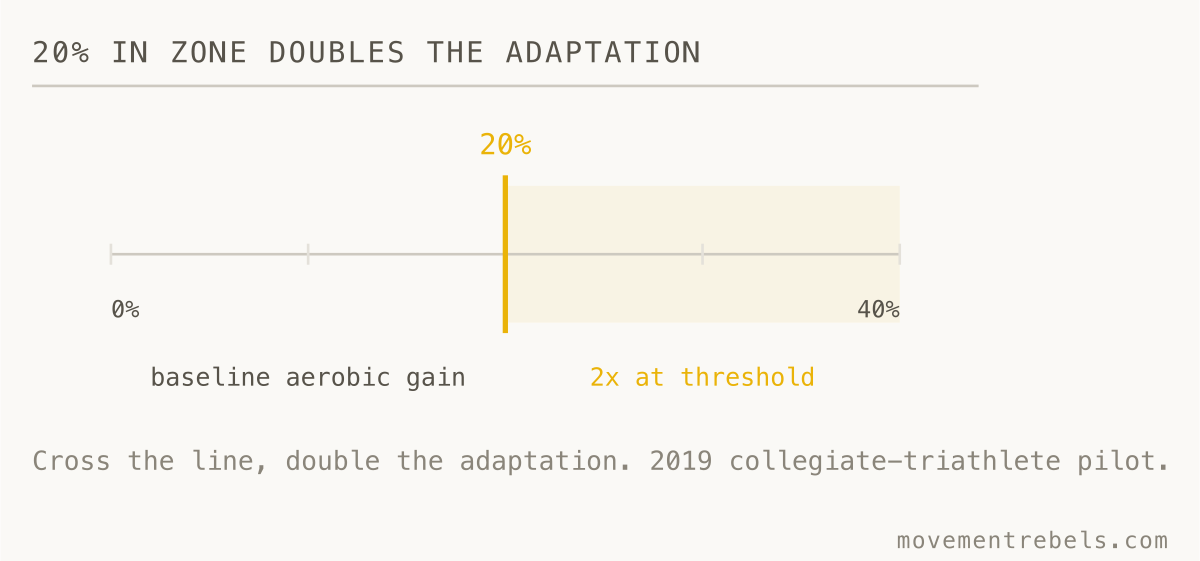
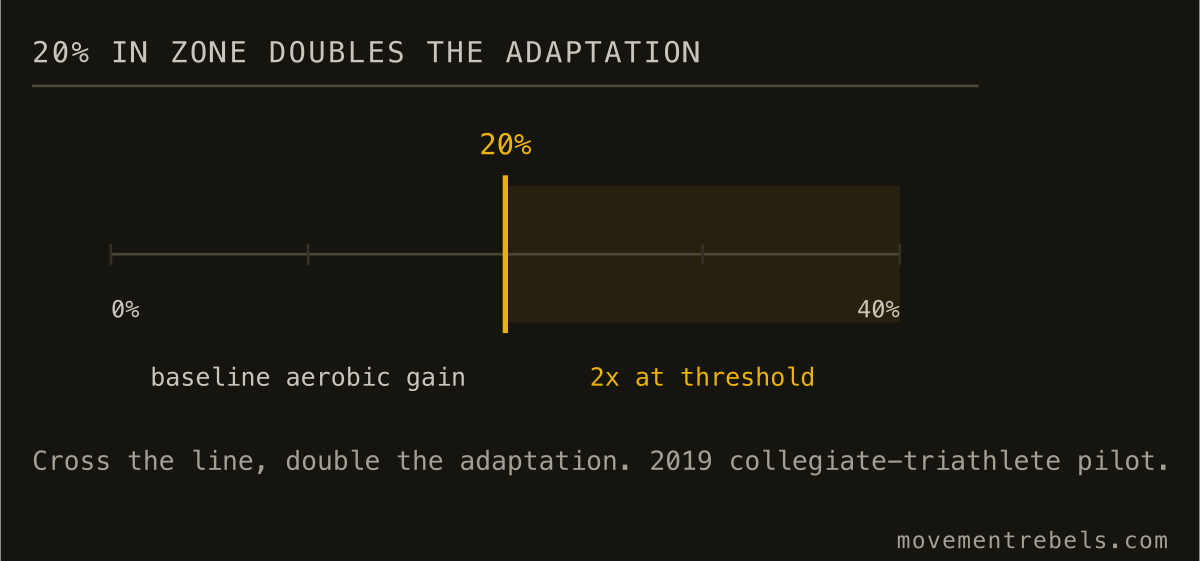
Research on threshold-based training prescription is clear that individualized targets outperform generic zones. A 2019 pilot study in PMC on collegiate triathletes found that athletes spending at least 20% of their training time in their correct individual zone showed more than double the aerobic improvement at metabolic threshold compared to athletes whose intensity distribution missed that window. The zones matter. The question is whether they survive the journey from plan to execution.
Movement Rebels solves that last mile by writing today's session straight into your Garmin as a structured workout through the official Garmin Connect Developer Program Training API. Press start, follow the watch.
What a structured workout is (and why it beats a note on your phone)
A structured workout on Garmin is not a calendar reminder. It is a sequenced file the watch runs as an active protocol: each step defined with a target (pace, heart rate, or power range), a duration, and a transition cue. The watch counts down each interval, vibrates when you drift out of zone, and auto-laps at every transition so your splits are clean in the data afterward.
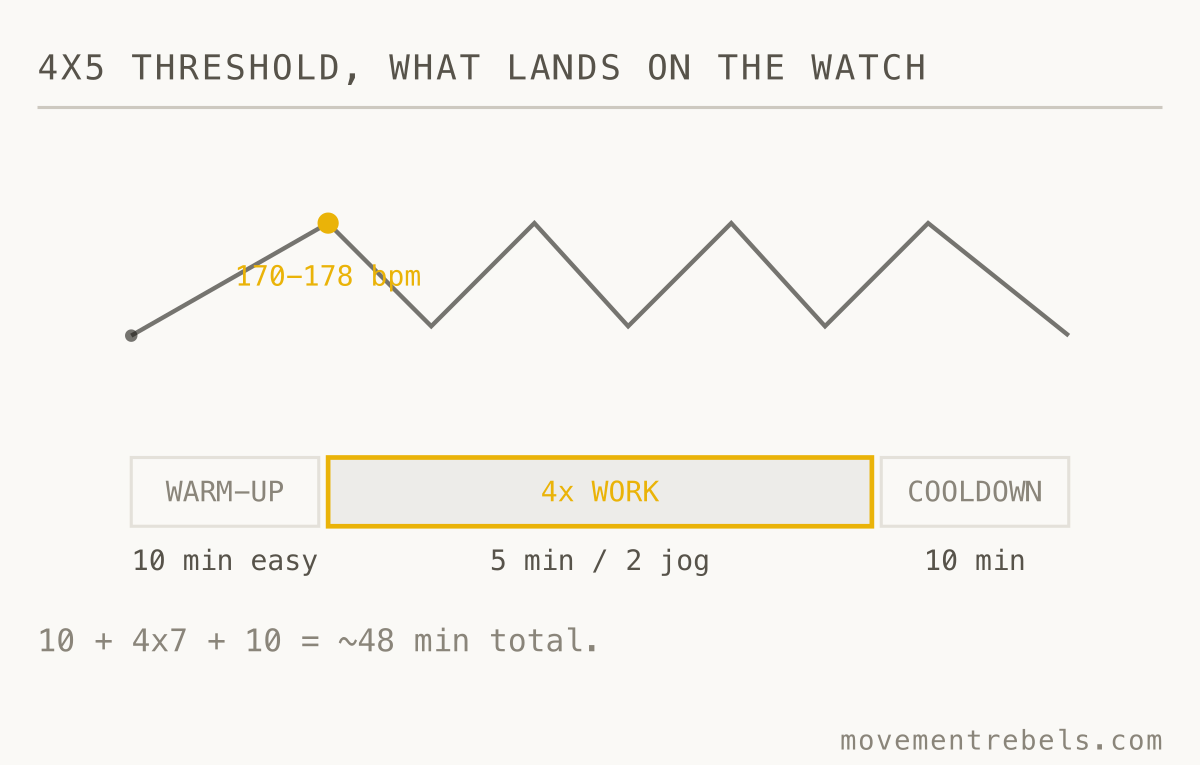
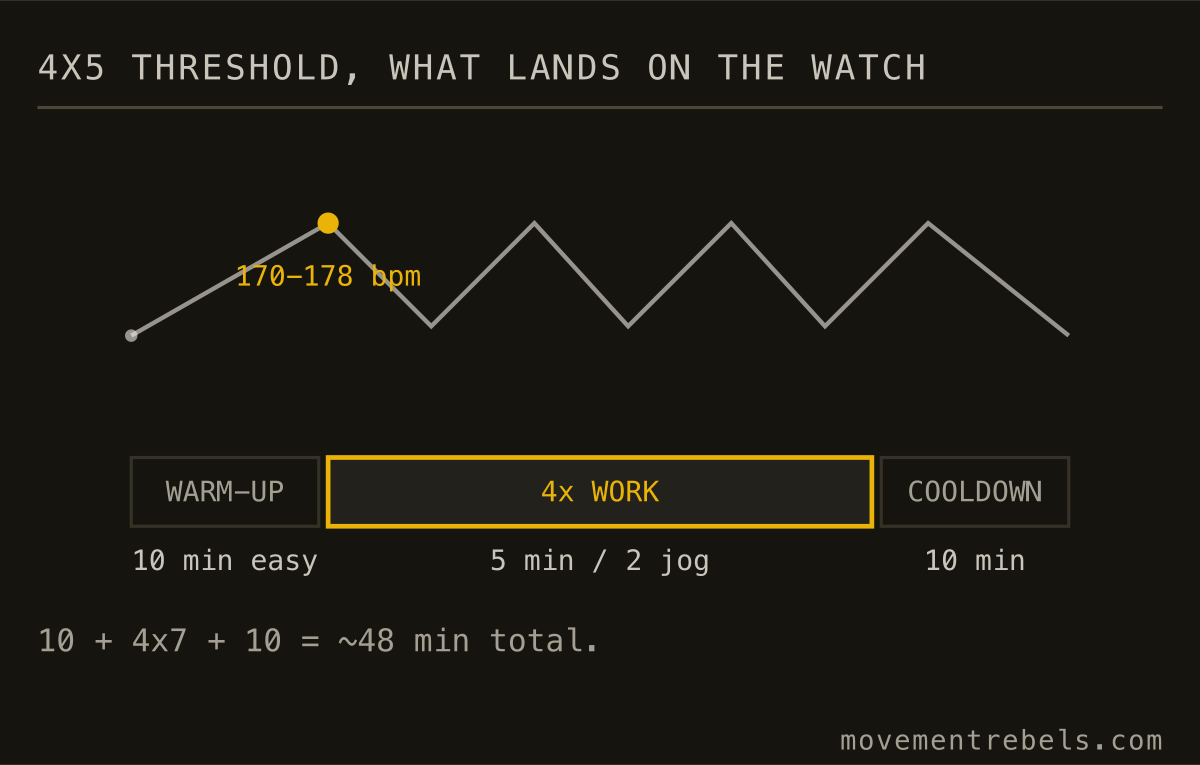
A 4x5 minute threshold session lands on the watch as: 10 min warm-up easy, then repeat 4 times (5 min at 170-178 bpm, 2 min jog recovery), 10 min cooldown. The watch executes that. You do not have to track anything or watch a stopwatch. When the fifth-minute vibration comes, you back off. That feedback loop matters because real-world training adherence to unsupervised HIIT averages around 63% without external scaffolding. Having the watch itself prompt each step is the scaffolding.
Most recreational athletes never set up structured workouts on Garmin because building them by hand in Garmin Connect is tedious. The interface exists. The capability is there. Almost nobody uses it. That is the problem being solved here.
How the push works
Movement Rebels uses the Garmin Connect Developer Program Training API: the same official write access that platforms like Final Surge use. You connect once in Settings, accept the OAuth permissions, and the link is live. From that point on:
- Each morning the coach publishes today's session to Garmin Connect as a structured workout file
- It appears under Training and Planning, Workouts, and is auto-scheduled on your calendar
- Your watch pulls it on the next sync (usually within seconds when your phone is nearby; tap Sync Now if you just connected)
- On the watch: Training, Workouts, Today, start
No FIT file exports. No USB transfers. No copy-pasting intervals into the Garmin app. The same OAuth that lets Movement Rebels read your completed activity data also lets it write workout files back.
The coach at work behind that push is described in more depth in the Garmin AI coach guide: what your watch captures, what a coach actually needs on top of that data, and how the two layers fit together.
What gets pushed, in concrete terms
Endurance sessions (running, cycling, rowing): each step gets a heart rate or pace target range, a duration, and a target type flag (time, distance, or open). Zone 2 rides get an HR ceiling and a pace floor. Threshold intervals get a band. Recovery steps get an easy ceiling. The coach picks between pace and HR as the primary target based on your integration setup and recent data quality. For the specifics of how zone boundaries get set, see Zone 2 heart rate, and if you want to define the bands yourself first, a heart rate zone calculator sets the five-zone targets the watch session rides in. On the bike, those same intervals can run on power instead, where a cycling power zones calculator turns your FTP into the seven Coggan zones the prescription uses. That number comes from a test, and the FTP calculator gives you the anchor every power target scales from.
Strength sessions on compatible Garmin devices (Fenix series, Forerunner 255 onward, Epix, Enduro, Edge 1040/1050 and newer): the session lands as a step-by-step strength workout card. Back squat day shows as warm-up, five working sets at your prescribed load, then accessories. The watch counts rest, prompts the next set, and logs the session into Garmin's activity history. The coach reads that file back when it syncs.
Hyrox and hybrid work: work/rest cycles and station sequences push as custom interval steps. The watch runs the clock; you run the burpee broad jumps.
The closed loop: push, execute, debrief
The push is leg one of a three-leg cycle.
After you finish, the activity syncs back to Movement Rebels through the same Garmin OAuth. The coach reads the completed file: time in zone, pace splits, HR drift across the session, any lap data. Within seconds of the sync, a post-session note appears in your coach chat: pacing review, what the data says about how you executed, what tomorrow looks like given today's load. If you have Strava connected, the coach also writes a clean session summary back to your Strava activity description automatically. Strava becomes the tidy training log it was always meant to be, without you editing descriptions by hand.
That feedback structure matters for the same reason the watch-side prompts matter. Prescription plus feedback is coaching. Prescription alone is a template. The adaptive training plan guide covers how the coach adjusts the following week's load based on what the completed file actually showed.
Recovery data shapes the workout before it pushes
The session on your watch reflects every signal the coach has before it publishes. If your HRV dropped overnight and Garmin's sleep summary shows 5 hours, today's threshold session does not push as planned. It either shifts to Zone 2 or the coach flags it in your morning brief and asks how you feel before publishing. The HRV-guided training guide covers how that readiness signal gets read and weighted.
Fueling crosses the same threshold. If your Rebel Fuel log shows you are 600 kcal short across three days, the coach will note it before tomorrow's high-intensity session lands on the watch. Under-fueled sessions at prescribed intensity produce neither the adaptation nor the data the plan needs. The practical side of that is in fueling around long training sessions.
What about COROS, Polar, and Suunto?
COROS, Polar, and Suunto do not expose a public structured-workout write API equivalent to Garmin's. What all three share is Apple Health export. Every workout, heart rate stream, and sleep block those watches record gets pushed into Apple Health on your iPhone. Movement Rebels reads Apple Health directly through the native iOS app, so the coach sees your training load, recovery, and execution whether your watch came from Garmin, COROS, Polar, or Suunto.
For the watch-side experience, COROS users can mirror today's structured session into the COROS Training Hub by hand: the session card in Movement Rebels spells out every step with targets, so manual entry takes a couple of minutes. Polar Flow and Suunto App work the same way. Direct structured-workout push for those platforms is a planned integration. In the meantime, the coach quality, plan adaptation, and post-session debrief are identical.
WHOOP and Oura are recovery and readiness trackers, not watches with workout-execution screens. WHOOP does not export its recovery or strain scores to Apple Health, so Movement Rebels cannot read those proprietary metrics. Oura exports HRV, sleep, and resting heart rate to Apple Health, so the iOS app picks those up. The honest position on both devices: they measure specific things well, and Movement Rebels is the coaching and planning layer they lack. Where the device exports to Apple Health, the data flows in automatically. Where it does not, you bring the context to the coach chat directly.
For a side-by-side breakdown of what each platform captures and what stays siloed, see WHOOP vs Oura vs Garmin.
Hybrid athletes: one app for all of it
Most "push to watch" tools handle only endurance work. Movement Rebels writes strength, endurance, and hybrid sessions through the same integration. The lift, the run, the swim, the row, the Hyrox station prep: one structured workout file per day, generated by the same coach that planned the full week, logged against the same body composition trend, baseline tests, and recovery read. Managing that mix without letting either the strength or the endurance side erode is a specific challenge. The hybrid athlete training guide covers the concurrent load problem in detail.
How Movement Rebels handles this
The Garmin push is included on all tiers. Free users get a 7-day full-access trial with no card required. After the trial, Pro+ is $20/month: unlimited adaptive plans, unlimited coach chat, unlimited workout pushes, full Rebel Fuel and recovery toolkit (breathwork, NSDR, cold exposure, fasting timer, snap meal, baseline tests). One app instead of five.
One app instead of five.
Strength, endurance, recovery, fueling, planning, and your AI coach. All under a 7-day free trial. No card.
Start 7-day trialGarmin AI Coach: What Your Watch Knows vs. What a Coach Needs to Know
Garmin's built-in coaching balances run and ride load using its own metrics. An AI coach reading the same data programs everything
Adaptive Training Plans: How the Plan Adjusts to You
Adaptive training is real science with honest limitations. What peer-reviewed research says about autoregulation and HRV-guided pl
HRV-Guided Training: Read the Signal, Skip the Noise
One low HRV night tells you almost nothing. The 7-day-vs-28-day trend tells you nearly everything. Here is what the evidence actua
Zone 2 Training: When It Works, When It's a Waste
Zone 2 is real, old, and oversold. Here's the honest version: when low-intensity volume is your highest-leverage work, when it isn